What Is an Industrial Panel PC?
An Industrial Panel Pc combines a computer and display in one enclosure for use in industrial settings. It can sit on a control cabinet, machine, or production-line station. Operators use it to view process data, enter commands, and monitor equipment through a touchscreen or other input device. The integrated design can reduce cable clutter and simplify installation, though the right configuration depends on the job.
These systems are often built for conditions that ordinary office computers may not handle well. A sealed front panel can help resist dust or splashes, while a fanless design can reduce moving parts. Still, no device is truly universal. A washdown area, a warm cabinet, and a vibrating machine create different demands. Small details matter: screen brightness under factory lighting, glove-friendly touch response, available network ports, mounting depth, and access to service connections. Dust happens.
Choosing a panel PC starts with the application, not the product label. Buyers should check operating temperature, ingress protection ratings, processor needs, operating-system support, and compatibility with existing software and peripherals. These specifications should be verified against the actual installation conditions; marketing descriptions alone are not enough. A technically capable unit may still be a poor fit if its display is hard to read or its ports do not match the equipment. This guide explains what an Industrial Panel Pc is, how its main features work, and which practical questions help identify a dependable option. Some trade-offs remain, and they deserve a closer look.
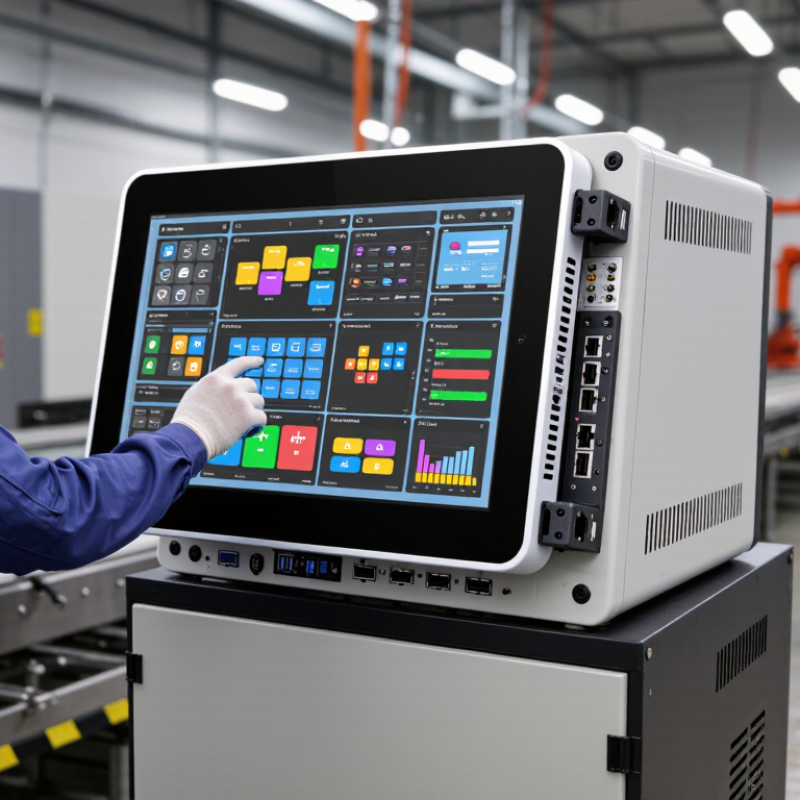
Definition and Core Components of an Industrial Panel PC
What Is an Industrial Panel PC?
Definition and Core Components of an Industrial Panel PC
An industrial panel PC combines a computer and display in one enclosure for use near machinery. Operators can view process data, enter settings, and respond to alarms from a fixed workstation. Unlike an office computer, it is designed for conditions such as dust, vibration, and frequent cleaning. Protection levels vary, so the installation environment matters.
Core components include a touch display, processor, memory, storage, and input/output interfaces. The display may use resistive or capacitive touch, depending on glove use and interaction needs. Inside, the processor runs the operating system and monitoring or control software. Ethernet, USB, serial ports, and digital I/O can connect scanners, sensors, and other equipment. The exact port mix is easy to overlook.
Small details matter.
A metal or reinforced enclosure supports mounting and helps protect internal components. Seals around the screen and connectors can limit dust or moisture, while thermal design moves heat away from the processor. Power input, grounding, and mounting points also affect reliable operation. Keep airflow and cable access in mind.
“Industrial” is not a single specification; ratings, temperature limits, and service life vary. A panel PC that looks rugged may still need a careful fit check before installation.
Trade-offs remain.
How an Industrial Panel PC Processes Data and Controls Equipment
What Is an Industrial Panel PC?
How an Industrial Panel PC Processes Data and Controls Equipment
An industrial panel PC combines a computer, display, and operator interface in one enclosure. It receives information from sensors, barcode readers, and machine controllers. For example, a temperature sensor may report a reading every second. The PC’s software checks that value against configured limits, then displays it or records it. Timing matters. The exact process depends on the hardware, operating system, and connected equipment.
To control a machine, the panel PC sends commands through supported interfaces or communicates with a programmable logic controller. An operator might tap a screen button to request a conveyor stop. The controller checks the command and manages the motor output. This division of work can improve clarity: the panel PC presents information, while a dedicated controller handles time-critical machine logic. Still, communication delays or incorrect settings can cause confusing screens or missed updates. A rugged enclosure helps protect components, but it cannot prevent every failure.
Tips: Check interface compatibility, cable routing, and environmental ratings before installation. Test alarms and recovery behavior under realistic conditions. Do not assume a responsive screen means every control signal arrived correctly.
Design Features for Demanding Industrial Environments
An industrial panel PC combines a computer and display in one enclosure, mounted at a machine or operator station. Its design is less about sleekness and more about surviving heat, dust, vibration, washdown, and long shifts. Industry used about 37% of global energy in 2022, according to the International Energy Agency’s Energy Efficiency 2023 report. That setting makes thermal design important. Fanless cooling can reduce dust intake and moving-part failures, but sealed cases may trap heat. Engineers need to match processor load, enclosure size, and ambient temperature rather than assume fanless is always better.
The front panel should resist the actual cleaning routine, not just look rugged. Under IEC 60529, an IP65-rated enclosure is dust-tight and protected against water jets, but it is not suitable for immersion. Touchscreens must remain usable with gloves and resist scratches; physical buttons can still help when operators wear wet gloves. Mounting also matters: vibration can loosen connectors, so secure fittings and strain relief are practical details. I/O ports should be placed where cables will not snag during maintenance. A high ingress rating is not a cure-all. Harsh chemicals, direct sunlight, and rapid temperature changes can still shorten service life, and specifications do not replace testing in the intended installation.
Common Types and Configurations of Industrial Panel PCs
Industrial panel PCs combine a display, computer, and touch interface in one housing for machine-side operation. Their form depends on where they will be installed and what operators need to see or control. A panel-mount model fits through a cabinet cutout, leaving its screen and bezel exposed. It suits control rooms and production lines where the rear enclosure stays protected.
Open-frame models have no finished front bezel, so equipment makers can integrate them into custom consoles or machines. Fanless designs use passive cooling instead of moving air. This can reduce dust intake and maintenance, though heat still needs a path out of the enclosure. Dust changes the calculation. For wet cleaning or frequent splashes, a sealed front and suitable ingress-protection rating matter; check the rating for the complete installation, not just the display.
Configurations vary in screen size, brightness, touch method, processor, memory, storage, and ports. Resistive touch can work with gloves or a stylus, while projected capacitive touch supports familiar gestures but may need compatible gloves. Sunlight-readable displays help near windows or outdoor equipment, but brightness can add heat and power demand. A larger screen is not automatically better: measure viewing distance and cabinet space. It is easy to overlook cable access, too. Leave room for connectors, service work, and airflow, even when the unit is fanless.
Industrial Applications and Key Selection Considerations
An industrial panel PC combines a computer and display in one unit, designed for installation near equipment or on a production line. Operators may use it to monitor temperatures, review machine status, or enter production data. Its sealed front can help keep out dust and splashes, but protection varies by model and installation. Heat matters.
These systems appear in food processing, packaging, warehouses, and utility facilities. A bright display can help in a sunlit loading area, while glove-compatible touch controls matter on a factory floor. In a washdown zone, check the specified ingress protection and cleanability rather than relying on the word “rugged.” Vibration, ambient temperature, and available mounting space also affect reliability.
Choose a unit by matching its environment and workload, not just its screen size. Confirm processor performance, memory, storage, and compatibility with required software and peripherals. Check the ports for existing equipment, such as serial devices or network connections. Consider operating-system support, replacement availability, and access for maintenance over the expected service life. A detail that is easy to miss: operators may view the screen from an angle or through protective glass, changing readability. Requirements are not always neat; a brighter display can add heat, and more sealing can complicate servicing. Test the intended setup where possible.