


7 Remote Gates Buying Tips for Global Buyers

Remote Gates can make a loading bay, farm entrance, or apartment driveway easier to manage from a phone or control room. Yet the right choice is not simply the gate with the longest wireless range. Buyers must weigh opening speed, duty cycle, power backup, access permissions, weather resistance, and local service support. A gate that stalls after repeated cycles is not a small inconvenience. Details matter.

The market context is growing. Grand View Research valued the global automatic gate opening system market at USD 2.65 billion in 2022 and projected a 6.8% compound annual growth rate from 2023 to 2030. This broad category is not a direct measure of remote-gate sales, but it signals rising investment in automated entry systems. Security deserves equal attention. Security technologist Bruce Schneier’s well-known reminder is, “Security is a process, not a product.” For buyers, that means checking credentials, audit logs, software updates, and who can revoke access—not just comparing remotes.

A reliable purchase starts with the site. Measure the clear opening, note the slope, and count daily vehicle movements before requesting quotations. Ask suppliers to state tested cycle capacity, backup runtime, installation responsibilities, warranty limits, and response times in writing. Then test the proposed controls with the people who will use them. A polished demonstration can miss muddy boots, weak signal, or a delivery driver waiting in rain. Some specifications still leave room for interpretation. That deserves a second question, not an assumption. These seven buying tips help global buyers compare Remote Gates with clearer criteria and fewer costly surprises.
7 Remote Gates Buying Tips for Global Buyers

Define Site Needs, Gate Purpose, and Operating Conditions

Before comparing remote gates, measure the opening, available clearance, and approach area. Record the gate’s width and height, then note slopes, nearby walls, and vehicle turning space. A sliding gate needs room along its fence line; a swing gate needs a clear arc. Small details matter. Photos taken from both sides can help suppliers understand obstacles that measurements miss.

Define what the gate must do each day. A busy delivery entrance may need faster operation and more frequent cycling than a private driveway. Consider who needs access, how remote users will be verified, and what should happen during a power or network outage. Ask about manual operation and compatible backup power. Then describe local conditions: heavy rain, dust, salt air, heat, or freezing temperatures can affect materials and moving parts. Check the actual site, not just the regional climate.

One detail buyers often overlook is the signal path between the controller and the gate. Thick walls, metal structures, and long distances can weaken connectivity, so test reception where equipment will be installed. Also identify a suitable power source and drainage around the base. I have seen planning focus on the gate itself while ignoring muddy access and maintenance space; that is an easy mistake to make. Clear site notes help suppliers recommend an appropriate configuration without guessing.
Compare Remote Gate Types and Access-Control Options

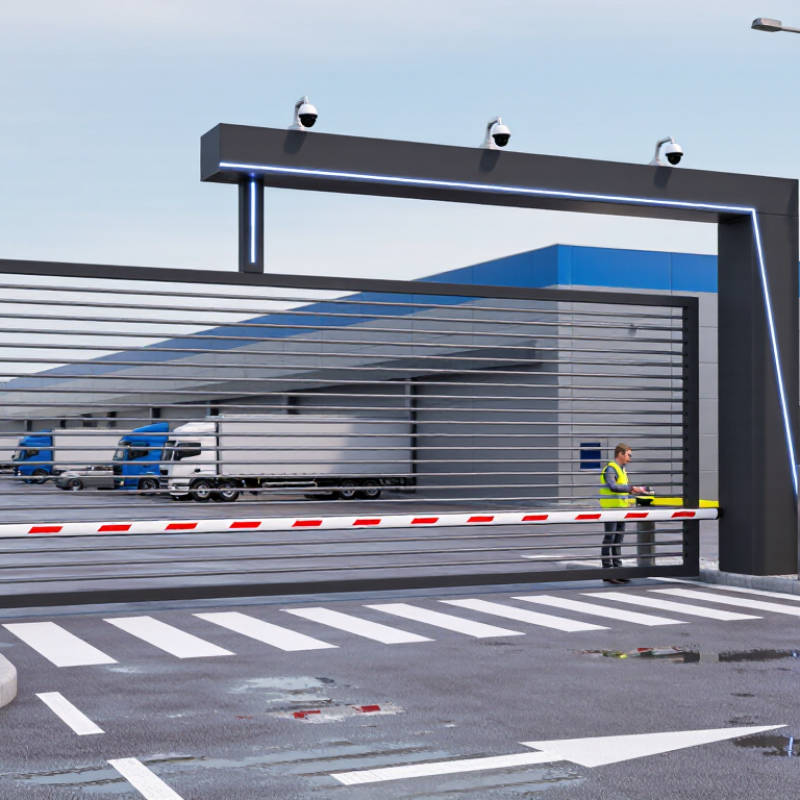
Remote gate types solve different site problems. Sliding gates move along a fence line, making them useful where a swing gate would block a driveway. They need a clear, level track and regular debris checks. Swing gates are simpler where there is room for the leaves to open, but wind and uneven ground can affect operation. Barrier arms suit busy vehicle entrances with short stopping times; they do not provide the same physical perimeter as a solid gate.

Access control should match how people actually arrive. Keypads are straightforward, while cards or mobile credentials can simplify access for frequent users. An intercom helps staff verify visitors, and vehicle sensors can reduce repeated manual operation. MarketsandMarkets’ 2023 Access Control Market report estimated the sector at USD 10.3 billion and projected USD 15.2 billion by 2028. That growth reflects varied systems, not one perfect setup. A tidy product comparison cannot show how rain, queues, or a delivery van affect daily use.

Tips: Measure the approach, clearance, and queue length before choosing a gate. Check power, backup operation, credential management, and compatibility with existing controls. Ask installers to explain safety sensors and maintenance needs for your site. Space matters. Test the user journey in person; plans can miss awkward details. Also confirm locally required safety features before purchase.

7 Remote Gates Buying Tips for Global Buyers - Compare Remote Gate Types and Access-Control Options
Buying tip Sliding gate Swing gate Vertical-lift gate Barrier arm Access-control options to compare
1. Match the gate to the site Moves parallel to the fence; needs clear runback space beside the opening. Needs room for one or two leaves to swing; check driveway slope and nearby paths. Rises vertically; requires suitable overhead clearance and supporting structure. Uses little lateral space and suits vehicle lanes where stopping is expected. Choose controls based on who needs entry: handheld transmitters for regular users, keypads or credentials for shared access.
2. Check wind and exposure A solid infill can catch wind; consider local wind loads and a suitably engineered gate and foundation. Solid leaves can impose substantial wind loads on hinges and posts; open infill can reduce wind exposure. Design and structural support must account for the gate’s weight and site-specific wind conditions. Wind load is generally lower than for a full-height gate, but the arm and mounting still need appropriate ratings. For outdoor readers, keypads, and enclosures, verify the stated temperature range and ingress-protection rating for the installation environment.
3. Assess traffic and opening speed Often suitable for frequent vehicle use when the operator and gate are rated for the duty cycle. Can work well for residential or lower-traffic entrances; leaf size, weight, and cycle frequency affect operator selection. Can suit sites that need vertical movement, but installation and maintenance requirements are site-specific. Commonly used for controlled vehicle lanes with frequent passage; it regulates traffic but does not provide a full-height barrier. Check reader response, credential capacity, and whether entry records or scheduled access are needed.
4. Plan safety protection Use suitable entrapment protection, such as monitored photoelectric sensors or edges, as required by the design and local rules. Protect the swing path and hinge-side hazards; arrange sensors and safety edges for the actual layout. Use the manufacturer-specified safety devices and safeguards for the lifting mechanism and access area. Provide appropriate vehicle and pedestrian detection; use a breakaway or other specified safety feature where required. Remote access does not replace physical safety devices. Confirm applicable local codes and have the complete system assessed by a qualified installer.
5. Compare access methods Compatible control depends on the operator and its control inputs; confirm interoperability before purchase. Confirm that the selected operator supports the planned control devices and any required interface. Check control-system compatibility with the lift mechanism and site access equipment. Verify that the controller supports the intended lane controls and vehicle-detection equipment. Options include radio transmitters, PIN keypads, RFID or other credential readers, intercoms, and smartphone access. Verify protocol, receiver compatibility, and credential management.
6. Prepare for power or network outages Ask about manual release, battery backup availability, and whether backup operation meets the site’s needs. Confirm how the gate can be released safely if power fails, including any two-leaf operating requirements. Review emergency release procedures and backup-power options for the specific lift design. Determine how the arm will be raised or secured during an outage and whether a backup supply is appropriate. Battery backup may keep some operators running, but internet-dependent features can still be unavailable without a connection. Ask which functions work offline.
7. Budget for installation and upkeep Allow for a level track or a suitable trackless design, foundations, drainage, and periodic inspection of moving parts. Budget for strong posts and hinges, correct alignment, and inspection of the leaves and operator. Include structural work, specialist installation, and service access for the lifting equipment. Plan for arm and mechanism inspections, vehicle-loop or sensor checks, and replacement of wear items. Compare the total cost of readers, credentials, wiring, network connectivity, software, and support—not just the gate operator.

Final selection should be based on a site survey, the gate and operator specifications, local safety requirements, and the expected traffic level. Product availability and applicable regulations vary by country.

Check Safety, Security, Durability, and Technical Specifications

Remote gates can look similar in product photos, but safety details matter more than appearance. Ask how the system detects a person, vehicle, or object in its path. Check for obstruction sensors, force limits, and a manual release that remains usable during a power cut. Request test records for the gate’s actual size and weight, not just the motor in isolation. Remote access also needs scrutiny. Confirm how user credentials are protected, whether access logs are available, and how software updates are delivered. Change default passwords before operation. Small omission, serious risk.

Durability depends on the site. Coastal air, heavy rain, dust, and repeated daily cycles can expose weak materials or undersized motors. Check corrosion protection, weather ratings, drainage around the operator, and the stated cycle-life rating. Match the motor’s capacity to the gate’s weight, dimensions, and expected use, with some allowance for difficult conditions. Verify voltage, frequency, control wiring, and wireless-network compatibility for the installation location. Details matter. A specification sheet can still leave questions unanswered; I would ask the supplier to clarify unclear ratings in writing. Also confirm spare-part availability, service support, warranty terms, and any locally applicable installation or safety requirements before placing an order.

Confirm Regional Standards, Power, and Connectivity Compatibility

7 Remote Gates Buying Tips for Global Buyers

Confirm Regional Standards, Power, and Connectivity Compatibility

A remote gate must match the site, not just the product listing. Check the destination’s electrical supply, including voltage, frequency, grounding, and available circuit capacity. Confirm that the control unit and motor are rated for those conditions. A plug adapter cannot correct a voltage mismatch. Small details matter.

Tip: Ask the supplier for the electrical specifications and conformity documents for the exact model. Have a qualified local installer verify them against site requirements before purchase. Also check enclosure ratings for rain, dust, and temperature swings. A gate beside a coastal driveway may need different protection than one inside a dry warehouse.

Connectivity needs the same care. Identify whether the system uses Wi-Fi, Ethernet, or cellular service, then confirm that the connection is available where the control box will sit. For cellular models, check supported network bands and local coverage; roaming assumptions can fail. Test signal strength at the gate, not in the office. It is tempting to treat an app connection as a simple feature, but weak coverage can make remote operation unreliable. Keep a suitable local control method available, and ask the installer to test it after setup. Rechecking the basics feels repetitive, yet it is cheaper than troubleshooting a gate that cannot connect.

Evaluate Suppliers, Installation, Warranty, and Total Cost of Ownership

For global buyers, a remote gate is more than a motor and a controller. Ask suppliers for drawings, duty-cycle limits, component specifications, and references from sites with similar traffic and weather. A video call can clarify details, but request written answers too. Small details matter. Check expected lead times, spare-part availability, and support hours across time zones.

Before comparing quotes, share site measurements, gate weight, slope, power supply, wind exposure, and daily opening count. Ask who prepares foundations, runs cables, configures safety sensors, and tests the system after installation. Remote sites need a clear commissioning plan and local technician training. A cheap quote may exclude crane hire or trenching. Not always obvious.

Read warranty terms carefully: coverage periods, labor, shipping, corrosion, and wear items can differ. Confirm how faults are diagnosed remotely and who pays to ship replacement parts across borders. Estimate ownership costs over several years, including electricity, maintenance visits, batteries, software fees, and downtime. Forecasts are imperfect. Compare realistic service scenarios and keep a contingency for delays or unexpected repairs.

7 Remote Gates Buying Tips for Global Buyers

Evaluate suppliers, installation, warranty, and total cost of ownership before making a purchase.

How to use this chart: The scores are a practical checklist, not market-survey results. Prioritize safety, supplier reliability, and total cost of ownership, then confirm that installation, compatibility, and warranty terms fit your project.

Packaging machine ROI calculator

Need help figuring out if packaging automation is right for your business?


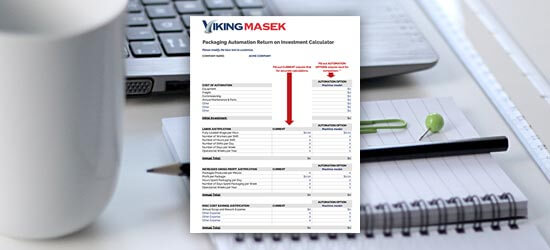
First, start with the numbers. Download our free packing machine ROI calculator to learn how long it will take for an investment in automation to pay for itself (and much more).


Free packaging automation ROI calculator